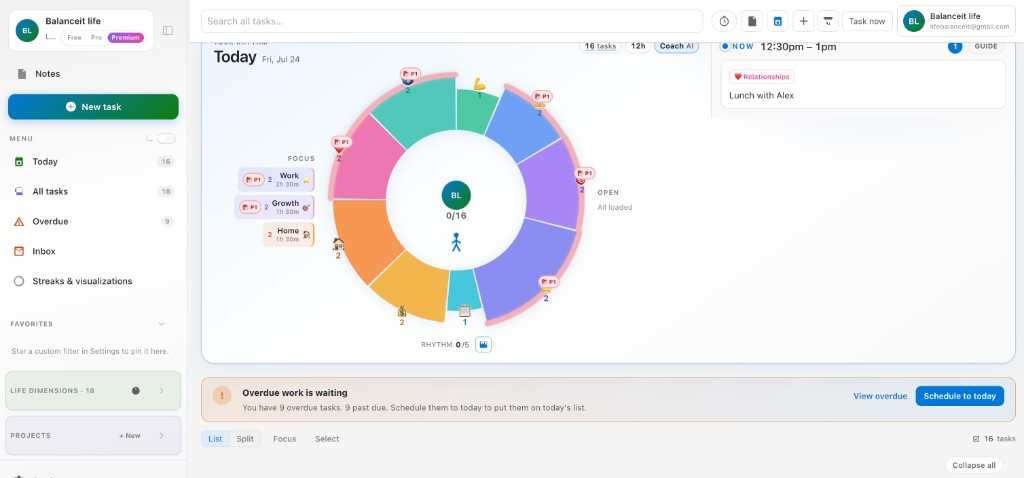
TodayNow · Next · Later. Clear priorities, not one endless list.
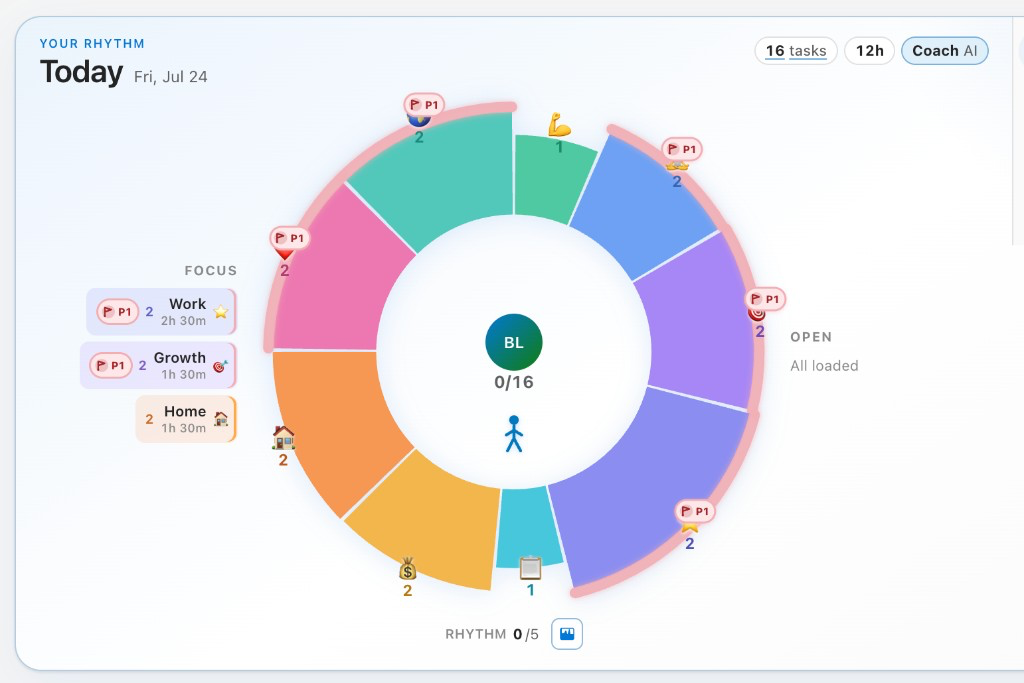
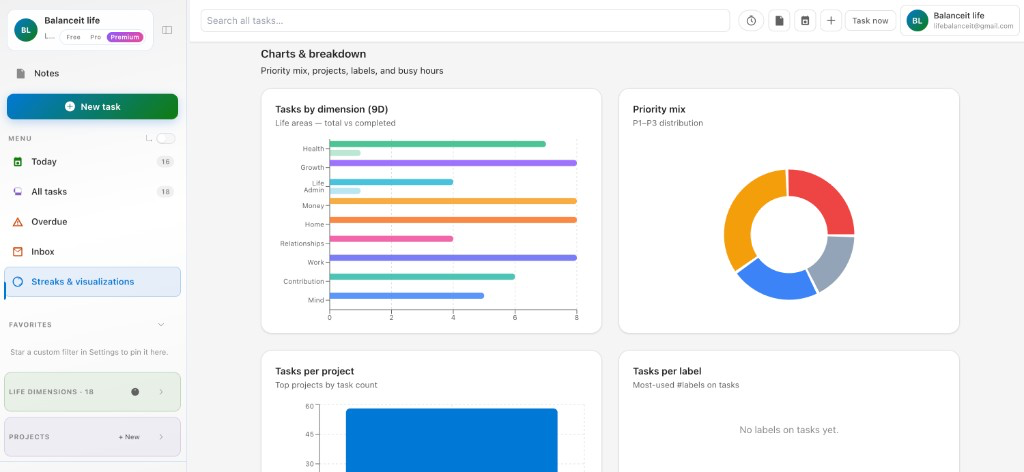
Life BalanceSee progress across your whole life — not just completed tasks.
AIM AIUnderstands what matters to you. Guidance · reflection · focus.
A calmer, more fulfilled you Less overwhelm · More clarity · Progress across your whole life · Time for what matters most
Same inputs. A more balanced, fulfilling life.
BalanceIt helps you capture everything, organize it by what matters, and take action with AIM.
Your life, connected
Your life, connected. Your priorities, clearer.
Your emails, calendar, tasks, notes, goals, and daily routines shouldn’t live in separate worlds. Discover how BalanceIt brings them together to help you focus on what matters.
Everyday tools & information
BalanceIt
One connected view of what matters to you.
What changes in your life
Know what matters today
Remember important commitments
Build consistent routines
Make progress on goals
Keep useful information close
Create time for relationships
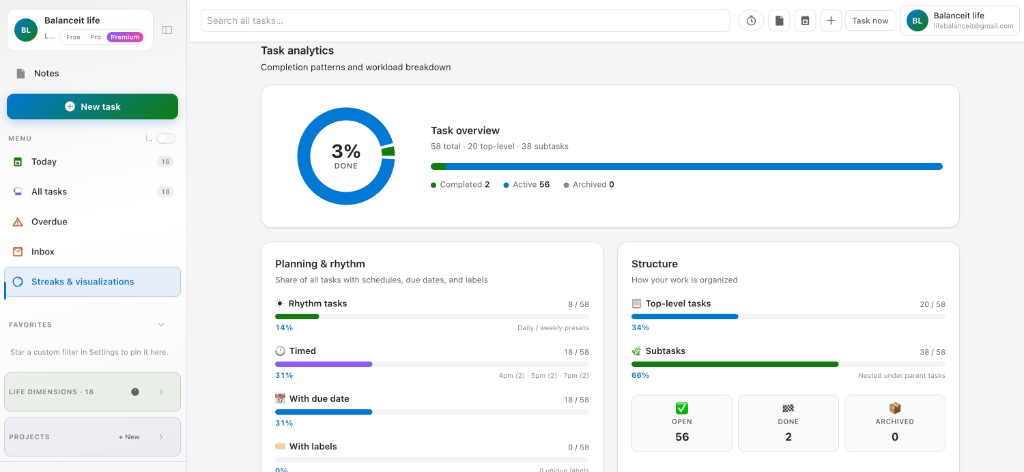
Understand progress across life
Turn important messages into actionable tasks.
Available now
Pro & Premium
What connects
Any email you choose to forward to your personal BalanceIt Capture Address.
What BalanceIt does
The message lands in your BalanceIt inbox. You review it, and accepting it creates a task you can place under the right area of life.
What you get
Fewer forgotten commitments buried in your inbox.
How it works: You send or forward it — BalanceIt never reads your accounts
Setup, limits & privacy
Setup
Copy your Capture Address once from your inbox.
Plan
Pro & Premium
Platforms
Works with any email provider that can forward mail.
Good to know
BalanceIt does not connect to or scan your mailbox. Only what you forward arrives.
Privacy
Forwarded messages are stored in your account like any task note. Nothing else in your mailbox is accessed.
Capture a task the moment it comes up in a conversation.
Available now
Pro & Premium
What connects
WhatsApp and Telegram — you message BalanceIt directly.
What BalanceIt does
Your message becomes an inbox item, ready to place, without switching apps.
What you get
Thoughts captured in seconds instead of lost in a chat thread.
How it works: You send or forward it — BalanceIt never reads your accounts
Setup, limits & privacy
Setup
Connect WhatsApp or Telegram once from Settings.
Plan
Pro & Premium
Platforms
WhatsApp and Telegram on any phone.
Good to know
BalanceIt only sees messages you send to it — never your other chats. Daily capture limits apply.
Privacy
Your other conversations are never read.
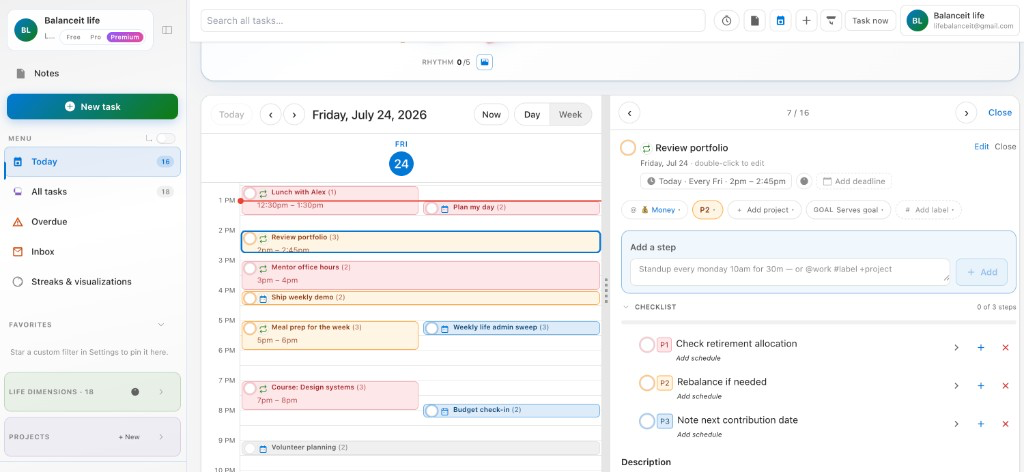
See the shape of your week before it happens.
Available now
Pro & Premium
What connects
Your BalanceIt tasks, deadlines and recurring activities.
What BalanceIt does
The Rhythm Calendar lays them out across the week, so work, family and personal time sit side by side.
What you get
Better visibility into what’s coming — and room left for what matters.
How it works: You do it — nothing happens without you
Setup, limits & privacy
Setup
No setup. It uses what you already plan in BalanceIt.
Plan
Pro & Premium
Platforms
Web, mobile and desktop apps.
Good to know
Syncing with Google Calendar or Outlook is not available yet. The Rhythm Calendar shows what you plan in BalanceIt.
Privacy
No external calendar is accessed.
Know what deserves your attention today.
Available now
Included in Basic
What connects
Everything you capture, with priorities, subtasks and recurring tasks.
What BalanceIt does
Today brings your priorities together in one calm view instead of one endless list.
What you get
Clearer decisions about what to do next.
How it works: You do it — nothing happens without you
Setup, limits & privacy
Setup
No setup.
Plan
Included in Basic
Platforms
Web, mobile and desktop apps.
Good to know
Basic includes up to 100 active tasks and 3 projects.
Privacy
Your tasks stay in your BalanceIt account. See the Trust page for how data is handled.
Capture an idea now and find it when you need it.
Available now
Included in Basic
What connects
Notes, useful links and things you want to remember.
What BalanceIt does
Keeps Quick Links and notes beside the area of life they belong to, and helps you retain what you learn with Memory.
What you get
Less time searching. Important thoughts are easy to revisit.
How it works: You do it — nothing happens without you
Setup, limits & privacy
Setup
No setup.
Plan
Included in Basic
Platforms
Web, mobile and desktop apps.
Good to know
Basic includes 200 memories and 10 MB of note storage.
Privacy
Your notes stay in your BalanceIt account. See the Trust page for how data is handled.
Connect daily work to the goals it serves.
Available now
Included in Basic
What connects
Your goals and projects, linked to the tasks that move them forward.
What BalanceIt does
Shows which tasks serve which goal, so today’s effort adds up to something you care about.
What you get
More intentional progress, less busywork.
How it works: You do it — nothing happens without you
Setup, limits & privacy
Setup
No setup.
Plan
Included in Basic
Platforms
Web, mobile and desktop apps.
Good to know
Not every task needs a goal — link them when it helps.
Privacy
Your goals stay in your BalanceIt account. See the Trust page for how data is handled.
See your progress across your whole life.
Available now
Included in Basic
What connects
What you complete and reflect on across your nine life dimensions.
What BalanceIt does
Your Life Balance score and Daily Reflection show where your attention went — and what’s been quietly neglected.
What you get
Easier reflection across work, health, relationships and more.
How it works: You do it — nothing happens without you
Setup, limits & privacy
Setup
No setup.
Plan
Included in Basic
Platforms
Web, mobile and desktop apps.
Good to know
The score reflects what you track in BalanceIt — it is a reflection aid, not a judgement.
Privacy
Your reflections stay in your BalanceIt account. See the Trust page for how data is handled.
Spend less time organizing, more time acting.
Available now
Premium only
What connects
Items you capture and the week you’ve lived in BalanceIt.
What BalanceIt does
AIM suggests the dimension, project and timing for what you capture, and can summarize your week as a short narrative.
What you get
Less manual organization — with you always in control.
How it works: AIM suggests — you keep, change, or ignore it
Setup, limits & privacy
Setup
No setup — use the AI button while adding a task.
Plan
Premium only
Platforms
Web, mobile and desktop apps.
Good to know
Includes 100 / month AIM AI operations. Suggestions are available in English for now.
Privacy
AIM only works with content already in your BalanceIt account.
From scattered information to meaningful action.
Capture
Organize
Prioritize
Make progress
See it in a real week.
Pick the life that sounds most like yours. Every step below is something BalanceIt does today.
The problem
Work emails, personal appointments and important tasks are scattered across apps.
With BalanceIt
Forward the client email that needs a reply by Friday.
Place it under Work and give it a priority.
Check the week on the Rhythm Calendar before saying yes to more.
Link it to the “Launch the new service” goal.
Emails → Tasks → Calendar → Goals
“A clearer picture of what deserves attention.”
Pro & Premium
The problem
Family responsibilities, school reminders and personal goals compete for attention.
With BalanceIt
Send “Sign the school trip form” to BalanceIt on WhatsApp.
Make Saturday’s park walk a recurring task under Relationships.
See family time sit beside work on the Rhythm Calendar.
Notice when Relationships hasn’t had attention for a while.
Chats → Tasks → Calendar → Life
“Make room for meaningful family moments.”
Pro & Premium
The problem
Good intentions — a walk, reading, an early night — keep getting forgotten.
With BalanceIt
Create “20-minute walk” as a recurring task under Health.
See it on Today alongside everything else that’s due.
Close the day with a short Daily Reflection.
Watch streaks and your Life Balance score show consistency over time.
Tasks → Life
“Turn intentions into routines.”
Included in Basic
The problem
Daily tasks feel disconnected from longer-term aspirations.
With BalanceIt
Set goals in Growth, Money and Health.
Link this week’s tasks and projects to the goal each one serves.
Use priorities on Today to decide what moves first.
See which areas are moving and which have stalled.
Goals → Tasks → Life
“Keep daily action connected to bigger goals.”
Included in Basic
The problem
Long notes and a busy inbox take time to turn into a plan.
With BalanceIt
Type a quick thought into a new task: “Book flights for the summer trip”.
Tap AI — AIM suggests Relationships, the “Summer trip” project and a date.
Keep the suggestion, change it, or leave it unorganized — your call.
At the end of the week, AIM Summarize turns it into a short narrative.
Tasks → AIM AI
“Spend less time organizing and more time acting.”
Premium only
Connected to the nine areas of your life.
A task isn’t just a task. BalanceIt places what you do in the part of life it serves, so progress means more than a longer checklist.
💪HealthPlan workouts, walks and appointments as routines.
🧠MindCapture reflections and protect quiet time.
🌱GrowthConnect learning tasks to a growth goal.
💼WorkTurn an important commitment into a prioritized task.
📋Life AdminTrack appointments, errands and deadlines.
💰MoneyOrganize bills, renewals and money goals.
🏠HomeKeep household jobs on a recurring rhythm.
❤️RelationshipsPlan family time and remember meaningful occasions.
🌍ContributionPlan volunteering and contribution goals.
BalanceIt doesn’t just connect your tools. It helps connect what you do every day with what matters in your life.
Premium includes 100 AIM AI operations a month. Additional credits are available when needed.
FAQ
Questions, answered.
Is BalanceIt another task manager?
No. Task apps help you finish what’s due. BalanceIt helps you make better weekly decisions across work, health, and life — so what has no deadline doesn’t disappear.
What is the Free Balance Assessment?
A quiz on the marketing site — about 3 minutes, no account required. It shows which life areas got your attention this week and which went quiet, then invites you to start free.
Who is it for?
People who clear their lists and still feel behind — professionals, parents, founders, and anyone redesigning a chapter of life.
What does the AIM AI Decision Companion do?
It asks better questions from your real week. It’s a guide, not an autopilot. You decide.
Is there a free plan?
Yes. Basic is free for as long as you use BalanceIt, not a time-limited trial. It organizes your life: all nine life dimensions, tasks and priorities, goals and projects, the Today dashboard, Daily Reflection, streaks, saved filters, dimension notes, and one Todoist import while you set up.
What does Pro add?
Pro ($9.99/month) connects your life: WhatsApp and Telegram capture, the email-to-task inbox, Todoist import any time, Connect Hub, plus advanced planning without AI — the Rhythm Calendar, metrics, Ideal Day, Life Intelligence insights, Follow Topics, Collaboration Spaces and the Developer API.
What does Premium add?
Premium ($27.99/month) helps you understand your life: everything in Pro, plus AIM task mode, AIM Coach, AIM Life Balance Intelligence, AIM Summarize and auto task summaries, with 100 AIM AI operations a month, priority support and more storage.
How is my data used?
To power your Life Map, insights, and optional companion prompts. See Privacy for details. We don’t sell personal data.
Can I keep Todoist?
Many people do. BalanceIt complements task managers by holding the wider life picture. See BalanceIt vs Todoist.
Where can I see what’s new in BalanceIt?
On our Changelog. We update this when something ships to production that you can feel in the product.